
SII CLI Overview
30-Second Quickstart
Prerequisites
- A SII account (recommended) or API key
Install SII CLI
1. Download Binary Files
Download SII CLI
Choose the version for your operating system and start using the AI-powered development assistant
macOS ARM64
For Mac computers with Apple Silicon chips
macOS Intel
For Mac computers with Intel chips
Linux
For mainstream Linux distributions
Windows
For Windows 10/11
2. Download via Command Line
Use curl to grab the full bundle (macOS offers both ARM64 and Intel x64 builds):
# macOS ARM64 (23.91 MB)
curl -L -o sii-cli-macos-arm64.zip https://dc-sh-public.tos-cn-shanghai.volces.com/sii-cli-macos-arm64-package.zip

# macOS Intel x64 (26.29 MB)
curl -L -o sii-cli-macos-x64.zip https://dc-sh-public.tos-cn-shanghai.volces.com/sii-cli-macos-x64-package.zipStart Using SII CLI
sii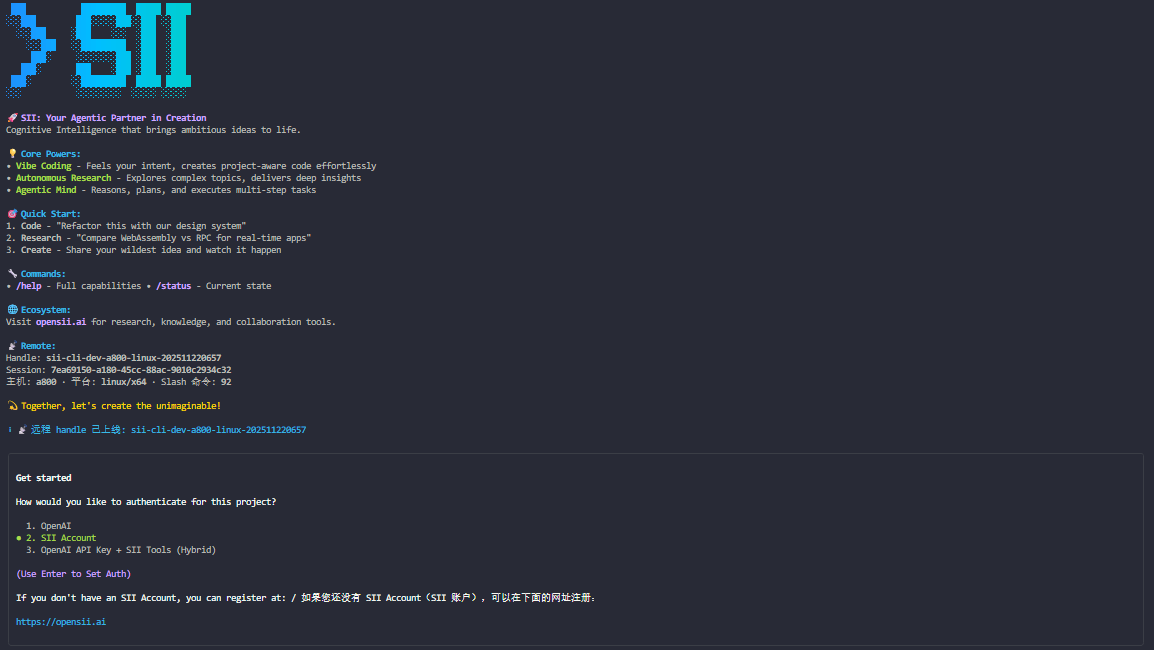
You'll be prompted to log in the first time. That's it!
Continue with Quickstart (5 minutes) →
What SII CLI Can Do
🚀 Build Features from Descriptions
Explain what you need in plain language. SII CLI plans, writes code, and keeps it working.
Build a simple Gomoku game
> Please help me build a lightweight two-player Gomoku mini game.SII CLI will:
- 📝 Understand your requirements
- 🗺️ Draft an implementation plan
- 💻 Write the necessary code
- ✅ Run tests to confirm everything works
🐛 Debug and Fix Issues
Describe a bug or paste an error. SII CLI will inspect the repo, pinpoint the issue, and apply a fix.
Fix a bug
> Fix the bug in our code.SII CLI will:
- 🔍 Locate relevant files
- 🧠 Understand surrounding context
- 🔧 Apply a solution
- 🧪 Run available tests
🗺️ Navigate Any Codebase
Ask anything about your team's project. SII CLI keeps a global view, can pull the latest info from the web, and fetches data from Google Drive, Figma, Slack, and other MCP sources.
Understand the tech stack
> What tech stack does this project use?Find the auth module
> Where is the authentication module located?Explain the database schema
> Walk me through the database schema.⚡ Automate Repetitive Work
Fix lint errors, resolve merge conflicts, or draft release notes—locally or in CI—with a single command.
Fix ESLint issues
> Fix all ESLint errors.Resolve merge conflicts
> Help me resolve the merge conflicts.Generate release notes
> Generate release notes for the latest commits.Why Developers Love SII CLI
💻 Works in Your Terminal
No new IDE to learn and no extra chat window. SII CLI runs where you already work and uses your existing tools.
🎬 Takes Direct Action
SII CLI edits files, runs commands, and creates commits. Need more? Through MCP it can read Google Drive docs, update Jira tickets, or call your custom tools.
Sample workflow:
Modify code
> Refactor the auth module to use async/await.Run tests
> Run the full test suite.Create a commit
> Help me create a commit.🔧 Unix Philosophy
Composable and scriptable commands fit naturally into existing automation.
Monitor logs and alert
> If you see any exceptions in the log, alert me immediately.Auto-translate new strings
> Whenever new UI strings appear, translate them into French and open a PR for @lang-fr-team.🏢 Enterprise Ready
Run on the Claude API or host on AWS/GCP. Security, privacy, and compliance are built-in.
Enterprise features:
- 🔐 End-to-end encryption
- 🏢 Private deployment options
- 📊 Usage analytics & auditing
- 👥 Team management and permissions
- 📝 Compliance certifications (SOC 2, GDPR)
Core Capabilities
Deep Code Understanding
SII CLI uses advanced models to understand your codebase:
- Context aware: Tracks project structure and dependencies
- Language agnostic: Works across mainstream languages
- Framework savvy: Detects the frameworks you're using
Connected Search
Fetch the latest documentation or answers in real time.
Learn React 18 best practices
> What are the latest React 18 best practices?Knowledge Base Integration
Tap into curated SII playbooks for proven solutions.
Optimize PostgreSQL queries
> How can I optimize PostgreSQL query performance?Git Integration
Work with Git conversationally:
View changes
> Which files did I modify?Smart commits
> Help me create a commit.Branch management
> Create a branch named feature/user-auth.Use Cases
Everyday Development
Add a new feature
> Add an avatar upload feature to the user profile page.Code review
> Review my changes and suggest improvements.Write tests
> Write unit tests for the calculator function.Debugging
Diagnose errors
> Investigate this error: TypeError: Cannot read property 'name' of undefined.Performance tuning
> This function is slow—help me optimize it.Documentation
Update docs
> Update the README with installation instructions.Generate API docs
> Generate API documentation for this module.CI/CD
Use in CI
> Check code quality and report any issues.Automate follow-ups
> If the tests fail, open an issue automatically.Next Steps
Additional Resources
- GitHub: github.com/GAIR-NLP/sii-cli
- Discord community: Join for tips and support
- Feedback: File an issue
- Release notes: See the latest version